In the ever-evolving world of gaming, creating the perfect space for your child to enjoy their favourite pastime is an increasingly popular endeavour for parents. A gaming room isn’t just about gaming consoles anymore—it’s about combining functionality, comfort, and cutting-edge technology to deliver an immersive experience. Whether your child is a casual player or a budding eSports enthusiast, here’s a step-by-step guide to building the ultimate gaming room, complete with the essentials like an MSI monitor and an Intel Core i7 CPU.

Step 1: Choosing the Right Space
The first step in building a gaming room is selecting the right space. Ideally, this should be a dedicated area where your child can immerse themselves without distractions. A spare bedroom, a section of the living room, or even a converted attic can work. Consider the acoustics, lighting, and ventilation of the space. Gaming setups generate heat, and proper airflow is essential to keep devices running smoothly.
Step 2: The Heart of the Gaming Setup: The PC or Console
The cornerstone of any gaming room is the gaming device. While consoles like the PlayStation 5 and Xbox Series X remain popular choices, a gaming PC is a long-term investment for a more versatile and powerful experience.
When selecting a gaming PC, components like the CPU and GPU are critical. An Intel Core i7 CPU is an excellent choice, offering powerful performance for gaming, multitasking, and even streaming. Its ability to handle intensive games and processes ensures a smooth and lag-free experience. Pair this with a high-performance GPU, and you’ll have a system capable of running even the most demanding games.
If your child prefers console gaming, ensure the room is equipped with enough outlets and a good HDMI setup to seamlessly switch between devices.
Step 3: The Display: Why an MSI Monitor Is a Must
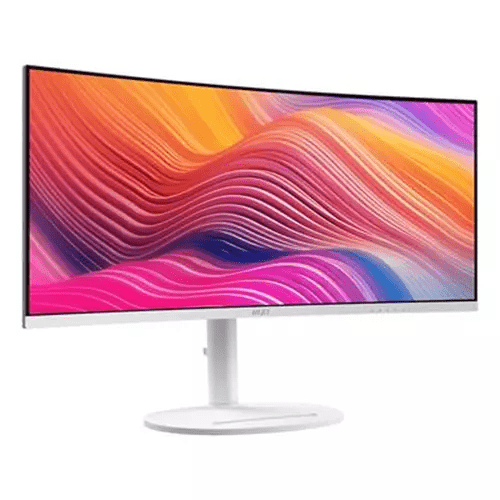
A high-quality monitor is a non-negotiable component of any gaming room. The MSI monitor is a fantastic option for gamers of all levels. Renowned for their high refresh rates, low response times, and vibrant colour accuracy, MSI monitors deliver stunning visuals that bring games to life. Look for features such as 144Hz or higher refresh rates for competitive gaming and a curved screen for an immersive experience.
Ensure the monitor is appropriately sized for the room; a 27-inch display is usually a great balance for most setups. Adjustable stands and mounts can also help position the screen at the ideal height for ergonomic comfort.
Step 4: Comfortable Seating and Ergonomics
Comfort is paramount when designing a gaming room. Long gaming sessions can strain the body, so investing in an ergonomic chair is a must. Gaming chairs with adjustable lumbar support, armrests, and reclining features are excellent choices.
For an even cosier atmosphere, consider adding a bean bag chair or a couch for casual gaming. Proper posture and comfort not only enhance the gaming experience but also prevent long-term health issues.
Step 5: Lighting and Ambience
Lighting can make or break a gaming room. Harsh overhead lights can cause glare on screens, while dim, coloured LED lights add a futuristic and immersive vibe. RGB light strips are popular among gamers and can be installed along desks, shelves, or walls.
Smart lighting systems allow your child to customise the room’s ambience with different colours and brightness levels. Natural light is another important factor—ensure windows have blackout curtains or blinds to control glare during daytime gaming.
Step 6: Audio Setup for Immersive Gaming
Sound plays a crucial role in creating an immersive gaming experience. A quality headset is essential for competitive gaming, providing clear communication and directional audio. Look for headsets with noise-cancelling features for an undisturbed experience.
For shared gaming experiences, consider installing a surround sound system. Soundbars are a great alternative for smaller rooms, offering a compact solution without compromising on audio quality.
Step 7: Organisation and Cable Management
A clutter-free gaming room is key to maintaining focus and efficiency. Invest in cable management solutions to keep wires tidy and out of sight. Velcro straps, cable sleeves, and under-desk organisers can make a huge difference.
Storage is another consideration. Shelving units, drawers, and gaming racks can store controllers, games, and accessories neatly. Keeping the space organised ensures your child can focus on gaming rather than searching for misplaced items.
Step 8: Accessories for the Ultimate Setup
Beyond the essentials, several accessories can elevate your child’s gaming experience. A high-quality keyboard and mouse combo is indispensable for PC gaming. Mechanical keyboards with customisable keys and a precise gaming mouse are great additions.
A webcam is a must if your child streams their gameplay. Pair this with a good microphone or a headset with built-in mic for crystal-clear communication. For racing or flight simulation games, consider investing in specialised controllers such as steering wheels or joysticks.
Step 9: Personalisation and Decoration
Allow your child to personalise their gaming room to reflect their style and interests. Posters, gaming-themed artwork, or collectibles can add character to the space. Neon signs or decals of their favourite gaming franchises are also great options.
A gaming-themed rug or beanbag with their favourite character’s logo can add a cosy touch. This is their space to enjoy, so involve them in the decoration process for a truly personalised setup.
Step 10: Internet Connectivity
High-speed internet is non-negotiable for online gaming. Ensure the room has a strong and stable Wi-Fi connection or, even better, a wired Ethernet connection. A Wi-Fi extender can help if the router is far from the gaming room.
For added security and reduced latency, consider a gaming router designed to prioritise gaming traffic. This ensures uninterrupted gameplay even during high internet usage.
Conclusion
Building the ultimate gaming room for your child requires thoughtful planning, the right technology, and attention to detail. From a reliable Intel Core i7 CPU and a visually stunning MSI monitor to ergonomic furniture and customisable lighting, every element contributes to creating a space that fosters comfort, fun, and creativity.
By balancing functionality with your child’s preferences, you can create a gaming haven they’ll love for years to come. So, start planning and get ready to watch your child level up in style!